Table of Contents
1. Dashboard & QR Management #
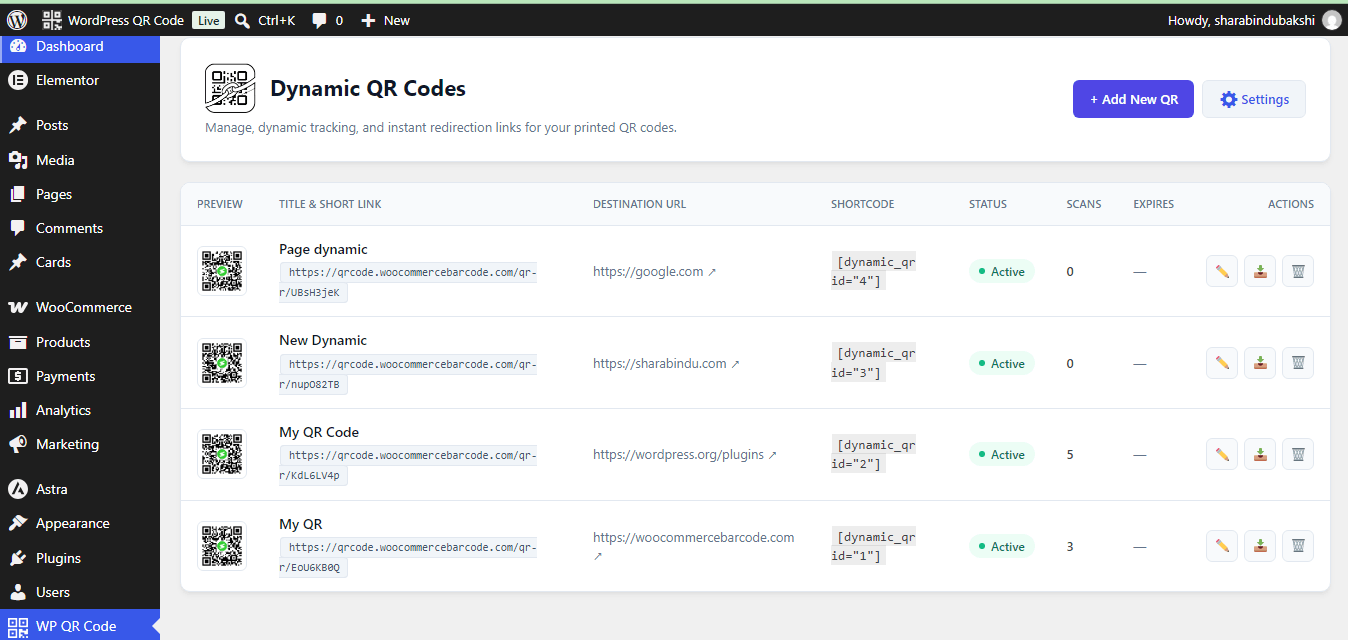
Navigate to WP QR Code > Dynamic QR Code to access the centralized management dashboard for creating, monitoring, and organizing shortcodes.
- Dynamic QR Codes Table: Displays all generated codes along with key metadata:
- Preview: Visual thumbnail of the generated QR code.
- Title & Short Link: The internal identifier and the permanent dynamic tracking URL (e.g.,
[https://qrcode.woocommercebarcode.com/qr/EoU6KB0Q](https://qrcode.woocommercebarcode.com/qr/EoU6KB0Q)). - Destination URL: The target web address to which visitors are redirected upon scanning.
- Shortcode: Auto-generated WordPress shortcode (e.g.,
[dynamic_qr id="1"]) for embedding dynamic QR codes into posts, pages, or widget areas. - Status: Current operational state of the link (e.g.,
Active).
- Actions:
- + Add New QR: Opens the interface to register a new dynamic link.
- Settings: Direct access to global styling and fallback configurations.
2. Global Settings & Fallback Configurations #
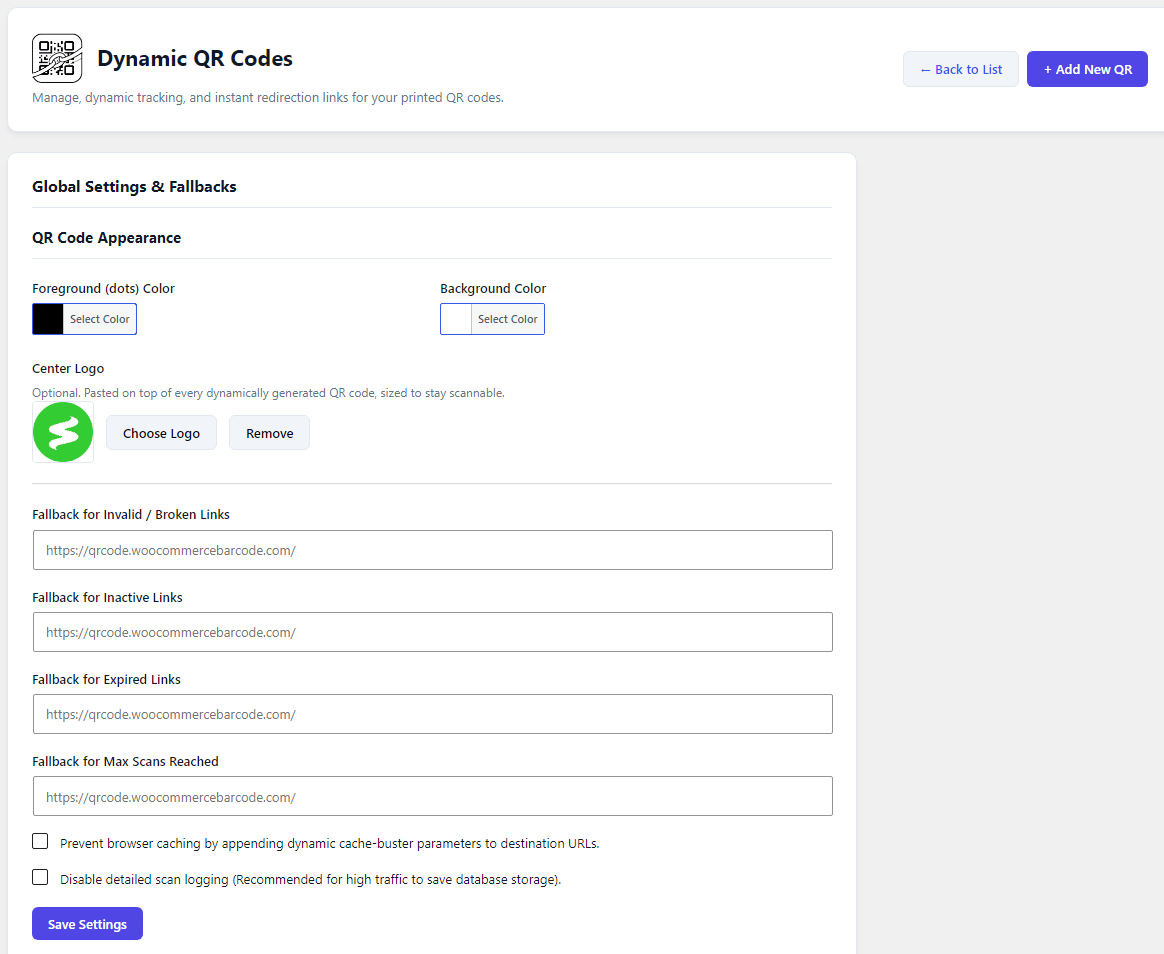
Configure site-wide defaults, custom styling options, dynamic redirection fallbacks, and performance optimizations.
- QR Code Appearance:
- Foreground (Dots) Color & Background Color: Color pickers to match QR styling with brand aesthetics.
- Center Logo: Upload a default center image (e.g., brand logo) overlaid on generated dynamic codes, automatically scaled for optimal scannability.
- Redirection Fallback URLs:
- Fallback for Invalid / Broken Links: Target URL if the scanned QR code ID does not exist or contains invalid parameters.
- Fallback for Inactive Links: Target URL when a QR code’s status is toggled off manually.
- Fallback for Expired Links: Target URL when a time-restricted QR code passes its validity threshold.
- Fallback for Max Scans Reached: Target URL served once a dynamic QR code hits its predefined scan quota limit.
- Performance & Cache Control:
- Prevent Browser Caching: Appends dynamic cache-buster parameters to destination URLs to prevent stale browser redirects.
- Disable Detailed Scan Logging: Option to disable high-overhead database logging during high-traffic campaigns to preserve database performance.
3. Analytics Overview & Real-Time Tracking #
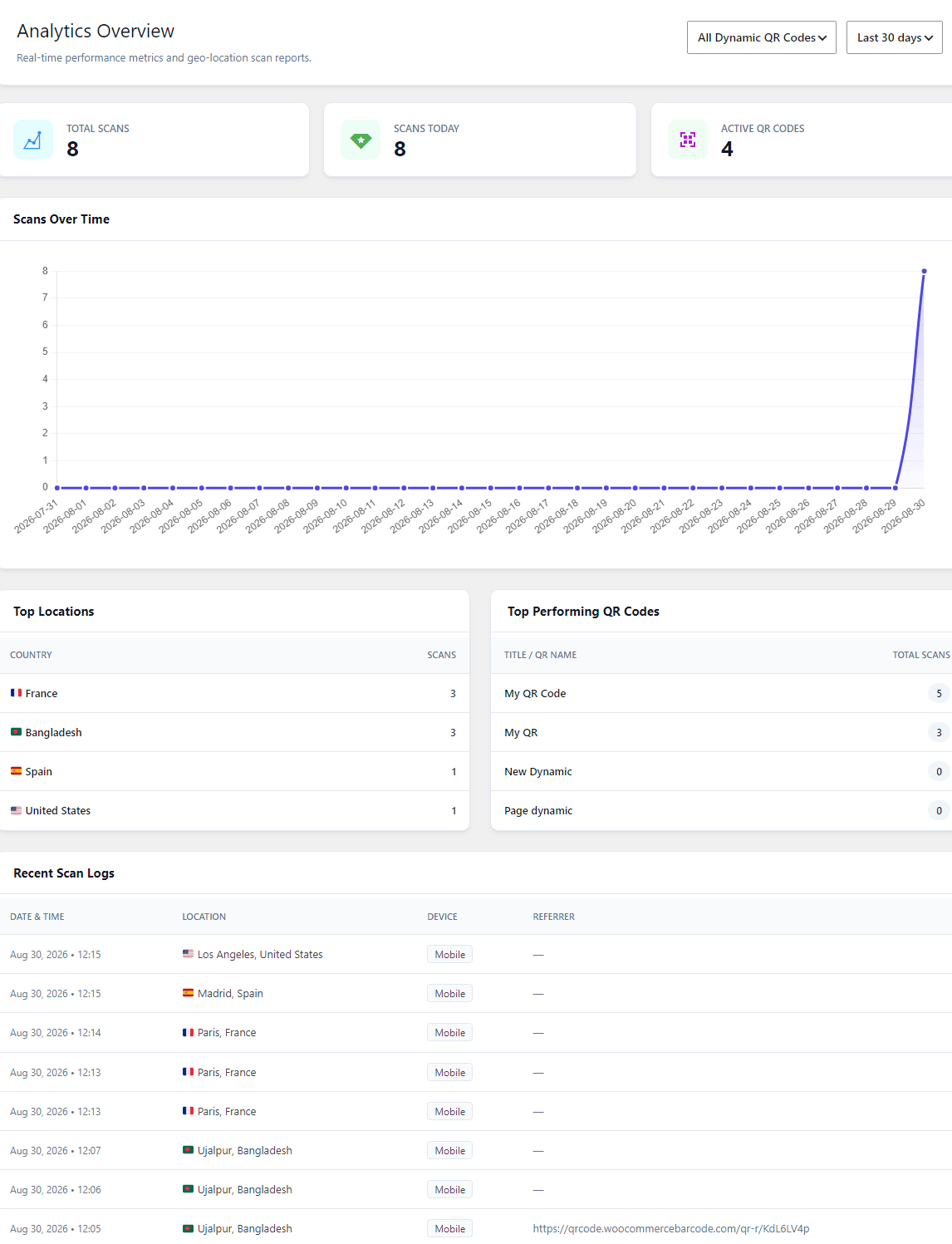
Navigate to WP QR Code > Analytics to view performance metrics, geographic data, and device insights.
- Key Performance Indicators (KPIs):
- Total Scans: Lifetime scan count across selected dynamic codes.
- Scans Today: Total scans recorded within the current 24-hour cycle.
- Active QR Codes: Total number of currently active dynamic links.
- Interactive Data Views:
- Scans Over Time: Graphical representation displaying scan trends over custom timeframes (e.g., Last 30 days).
- Top Locations: Breakdown of scan activity categorized by country and region.
- Top Performing QR Codes: Ranked list of dynamic codes based on aggregate scan totals.
- Recent Scan Logs: Real-time stream recording individual scan events, including Date & Time, Location, Device Type, and Referrer Header.
4. Gutenberg Block Integration (Dynamic QR Code) #
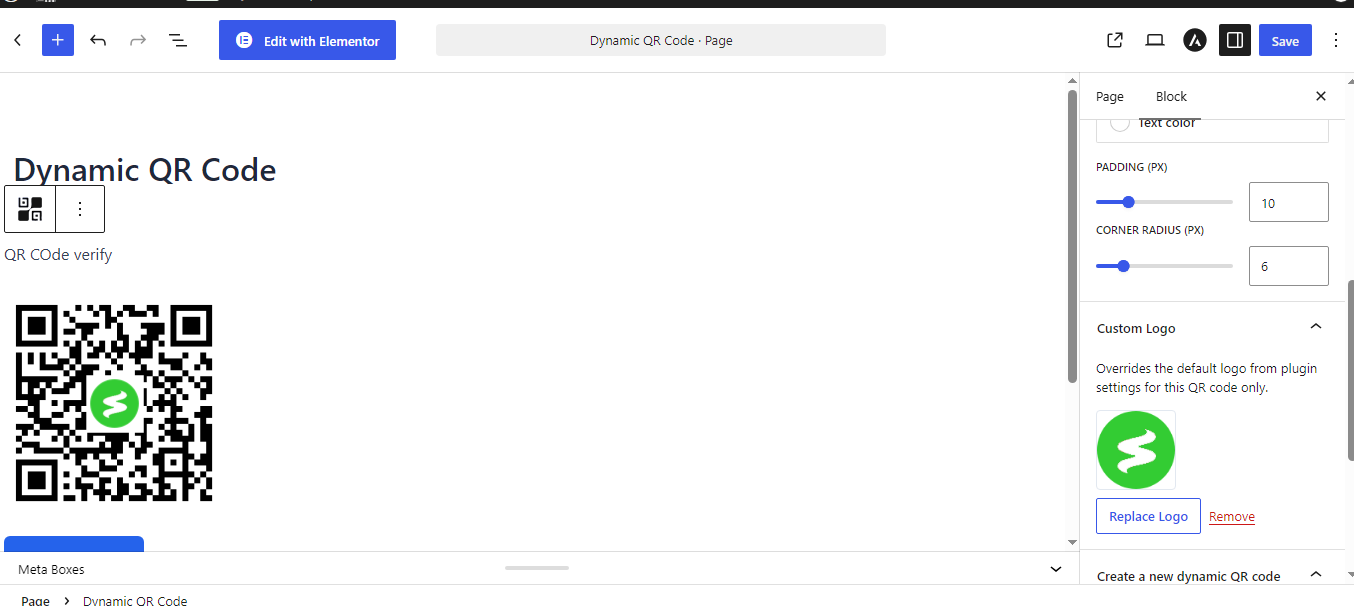
The plugin natively integrates with the WordPress Block Editor (Gutenberg) to embed dynamic QR codes directly into page layouts.
- Insertion:
- Search for Dynamic QR Code within the Gutenberg block inserter library.
- Block Inspector Settings:
- Existing Dynamic QR Code: Select an existing dynamic code from a dropdown menu.
- Size (PX): Set the display dimensions of the rendered code using a slider or direct pixel input.
- Display Toggles: Enable or disable
Show titleandShow download linkdirectly on the frontend. - Download Button Style: Custom controls for Background Color, Text Color, Padding (PX), and Corner Radius (PX).
- Custom Logo Override: Upload a custom logo to override the global center logo setting for that specific block instance.
- Create a New Dynamic QR Code: Generate a brand-new dynamic code directly from the block inspector by supplying a Title and Destination URL without leaving the editor page.